Color page analysis
Finds which pages contain color, so you are not guessing.
 PrintQuote
Coming to Google Play
PDF printing cost calculator for Android
Analyze color and black-and-white pages, set your printing rates, and get a clear cost estimate—all from your Android device.
Coming to Google Play
See How It Works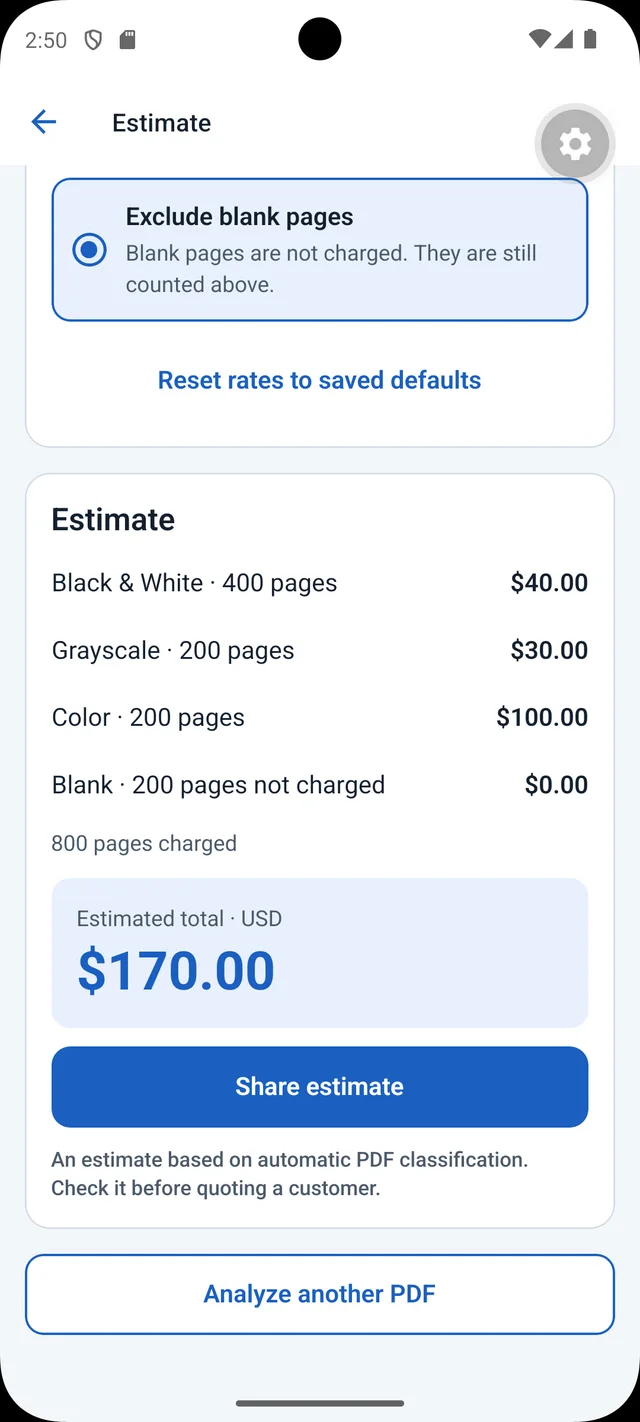
The problem
Many print shops charge more for color pages than for black-and-white ones. But a single colored logo or chart makes a page “color,” and that is difficult to spot by scrolling through a long document.
PrintQuote counts the color, grayscale, black-and-white, and blank pages for you, then applies your rates, so you know the estimated cost before you hand a file to anyone.
How it works
Pick any PDF stored on your Android device.
PrintQuote classifies each page as color, grayscale, black-and-white, or blank.
Enter what you pay per page type. Your rates are saved for next time.
See the page counts and the estimated cost, broken down by page type.
Features
Finds which pages contain color, so you are not guessing.
Enter the per-page prices that apply to you.
Turns page counts and your rates into an estimated total.
See how each page type contributes to the total.
Privacy
PDF analysis happens locally on your device. PrintQuote does not upload your documents to a remote processing server.
Read the privacy policy (opens in a new tab)Pricing
$0
Up to 10 PDF pages per analysis.
$4.99one-time
Removes the free version’s 10-page limit.
Purchases are handled by Google Play. Pricing details
No. PrintQuote calculates an estimate using the page counts it finds and the rates you enter. Actual prices come from the printing company, and may include paper, finishing, minimum charges, or other fees that you would need to add yourself.
PDF analysis happens locally on your Android device. The app does not upload your PDF documents to a remote processing server. The privacy policy describes the app’s data practices in full.
The free version analyzes PDFs up to 10 pages. Pro is a one-time $4.99 purchase through Google Play that removes the 10-page limit. There is no subscription.
It analyzes pages and classifies them as color, grayscale, black-and-white, or blank, and shows the page counts and results. You then apply your own printing rates to calculate an estimated cost.
PrintQuote is an Android app.
Coming to Google Play
PrintQuote provides estimates based on the rates you enter. It does not provide guaranteed quotes from printing companies.